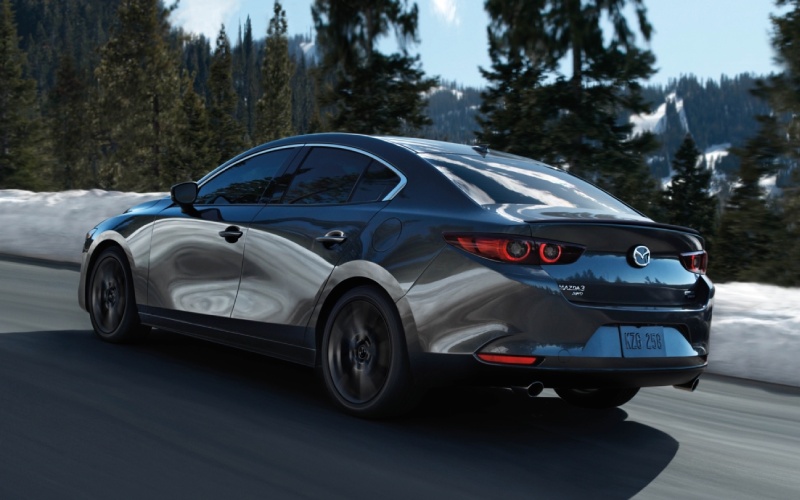
CardinaleWay Mazda Las Vegas - Does the 2026 Mazda Mazda3 Sedan have wireless CarPlay and Android Auto in Las Vegas, NV?
The 2026 Mazda Mazda3 Sedan integrates wireless Apple CarPlay® and Android Auto™ across the lineup, making everyday driving around Las Vegas feel easier, safer, and more connected without the hassle of cables. At CardinaleWay Mazda Las Vegas, we see shoppers ask how this tech works in real life—on I-15 commutes, quick dashes to Downtown, and rides to Allegiant Stadium—and we are glad to share what to expect, how to set it up, and why it adds real value in our city.
Mazda’s thoughtful approach shows up the moment you sync your phone. The intuitive Mazda Connect™ interface, the responsive center display, and natural-feeling voice control combine to help you navigate, stream audio, and message hands-free. If you have never tried wireless smartphone integration, the 2026 Mazda3 Sedan is a straightforward way to start—no learning curve required, just clear prompts and familiar apps presented through a refined, driver-focused cabin.
What wireless integration means in the 2026 Mazda3 Sedan
Wireless Apple CarPlay® and Android Auto™ let you access core phone features on the vehicle’s display without plugging in. Think turn-by-turn navigation from Apple Maps or Google Maps, playlists and podcasts from your preferred apps, and hands-free calls or texts using Siri or Google Assistant. It all works through the car’s built-in controls and voice activation, so your attention stays on Charleston, Sahara, or the 215 when traffic gets busy.
Every 2026 Mazda3 Sedan trim includes wireless smartphone integration, so you get this convenience whether you choose the 2.5 S, 2.5 S Select Sport, 2.5 S Preferred, 2.5 S Carbon Edition, or 2.5 Turbo Premium Plus. You will also appreciate the 8-speaker audio system with Mazda Harmonic Acoustics, tuned to deliver crisp sound that complements the Mazda3 Sedan’s quiet, solid ride.
How to pair your phone wirelessly the first time
Setup is quick, and you only need to do it once per device. Here is the general flow you will follow the first time you connect an iPhone or Android phone in your 2026 Mazda3 Sedan at our showroom or in your driveway.
- Start the Mazda3 Sedan and wait for the center display to load
- On the Mazda Connect™ screen, select the phone or connectivity menu
- On your phone, turn on Bluetooth and Wi-Fi
- Choose the Mazda3 from the list of available devices on your phone
- Confirm the pairing code on the phone and the vehicle screen
- Accept the prompts to enable Apple CarPlay® or Android Auto™
- Allow notifications and contacts if you want hands-free calls and messaging
After this first pairing, your phone will connect automatically when you start the car with Bluetooth and Wi-Fi enabled. If you ever prefer a wired connection, you can still plug in with USB and run Apple CarPlay® or Android Auto™ that way.
Everyday benefits for Las Vegas drivers
Las Vegas driving can shift from stop-and-go near the Strip to open stretches out by Summerlin. Wireless smartphone integration helps you adapt smoothly, whether you are sliding into a garage downtown or heading out to Red Rock on the weekend.
- Navigation that stays current and familiar through the apps you already use
- Voice control that keeps your hands on the wheel and eyes on the road
- Audio that starts where you left off without plugging in
- Quick switch between apps using the Mazda Connect™ controller or voice
- Clutter-free console that stays tidy for valet or rideshare pickups
Because it is wireless, you do not need to fumble for a cable when leaving a casino garage or a crowded event lot. Just get in, start the engine, and your maps, music, and messages are ready.
Trim availability and related tech in the 2026 Mazda3 Sedan
Wireless Apple CarPlay® and Android Auto™ are included on every 2026 Mazda3 Sedan. You can choose the drivetrain and package that fits your life without giving up this feature. The Mazda3 Sedan offers front-wheel drive or available i-ACTIV AWD®, paired with the SKYACTIV®-Drive 6-speed sport automatic. Regardless of configuration, you will find consistent connectivity and an easy-to-navigate interface on the center display.
In addition, Mazda Connected Services (1-year trial) is included, bringing helpful app-based features that complement your in-vehicle experience. While wireless Apple CarPlay® and Android Auto™ run your phone’s apps in the car, Mazda Connected Services helps you stay in touch with your vehicle through the MyMazda app for added peace of mind and convenience.
Compatibility notes and local pro tips
Most current smartphones support wireless integration, but a few quick checks help ensure day-one success. If your phone is a few years old, you may want to confirm compatibility before your test drive—our team is happy to help you verify in minutes at the dealership.
- Keep your phone’s software updated for the best connection stability
- If wireless pairing does not appear, try a simple phone restart
- Use a USB cable if you want faster charging during long drives
- Mount or stow your phone out of direct sun to help it stay cool
- Set your preferred navigation and music apps before you drive
Las Vegas heat can make phones work harder, especially during summer. Wireless connections may draw more battery than a typical day at home, so use in-vehicle power or a high-quality cable on longer drives when you want to keep your phone topped up.
Frequently Asked Questions:
Will wireless Apple CarPlay® and Android Auto™ work if my 2026 Mazda3 Sedan has i-ACTIV AWD®?
Yes. Wireless smartphone integration functions the same on front-wheel-drive and i-ACTIV AWD® models. Drivetrain selection does not change connectivity.
Do I need a separate data plan for wireless Apple CarPlay® or Android Auto™?
No. These systems use your phone’s existing data plan. Mazda Connected Services is a distinct offering with a 1-year trial, separate from Apple CarPlay® or Android Auto™.
Can I still plug in with USB if I want to charge while using CarPlay or Android Auto?
Yes. You can connect via USB at any time. Many drivers choose wireless for short trips and switch to a USB cable for longer drives when faster charging is preferred.
Will wireless smartphone integration drain my phone battery faster in Las Vegas traffic and heat?
Wireless connections can use more battery than a simple Bluetooth stream. We recommend enabling in-vehicle charging, keeping your phone out of direct sun, and using a USB cable when you want the quickest recharge.
From Spring Valley commutes to late-evening runs down Las Vegas Boulevard, the 2026 Mazda3 Sedan’s wireless Apple CarPlay® and Android Auto™ bring a clean, modern experience to every trip. You get fast access to the apps you rely on, thoughtful voice control that shrinks distractions, and a tidy cabin without cords.
If you would like to see how seamlessly your phone pairs with the Mazda3 Sedan, visit our showroom and bring your device. Our team at CardinaleWay Mazda Las Vegas will walk you through setup, answer compatibility questions, and send you out on a test drive so you can explore your routes with Apple CarPlay® or Android Auto™ in real time. We are here to help you choose the right Mazda3 Sedan—whether that is a confident i-ACTIV AWD® configuration or a well-equipped 2.5 S package—so your technology, driving feel, and daily routines in Las Vegas all align perfectly.
Ready to experience the 2026 Mazda Mazda3 Sedan and its wireless connectivity? Contact our sales team, schedule a visit, or stop by CardinaleWay Mazda Las Vegas to get started. We look forward to helping you find the right fit and getting you connected on day one.